
Resources
One command. A full audit of your app.
The whole kit as clean Markdown — 99 docs across 10 thematic files — plus the App Review Squad: eight static-audit roles and an optional Runtime Reviewer beta — Mac validation pending that can build and inspect configured-target flows. A lower-cost Quick pass covers facts, privacy and payments. Mechanical permission, entitlement, privacy-manifest, build and IAP snapshot checks run before the agents. You get an immutable run where every finding cites source, App Store Connect, dated public-HTTP or runtime evidence, App Review Notes pre-filled from what was found, and reply drafts for the rejections you’re most likely to get.
The download is included with the kit. Buy once, then grab the ZIP or point your AI at the files.
How it works
One skill. Three run profiles.
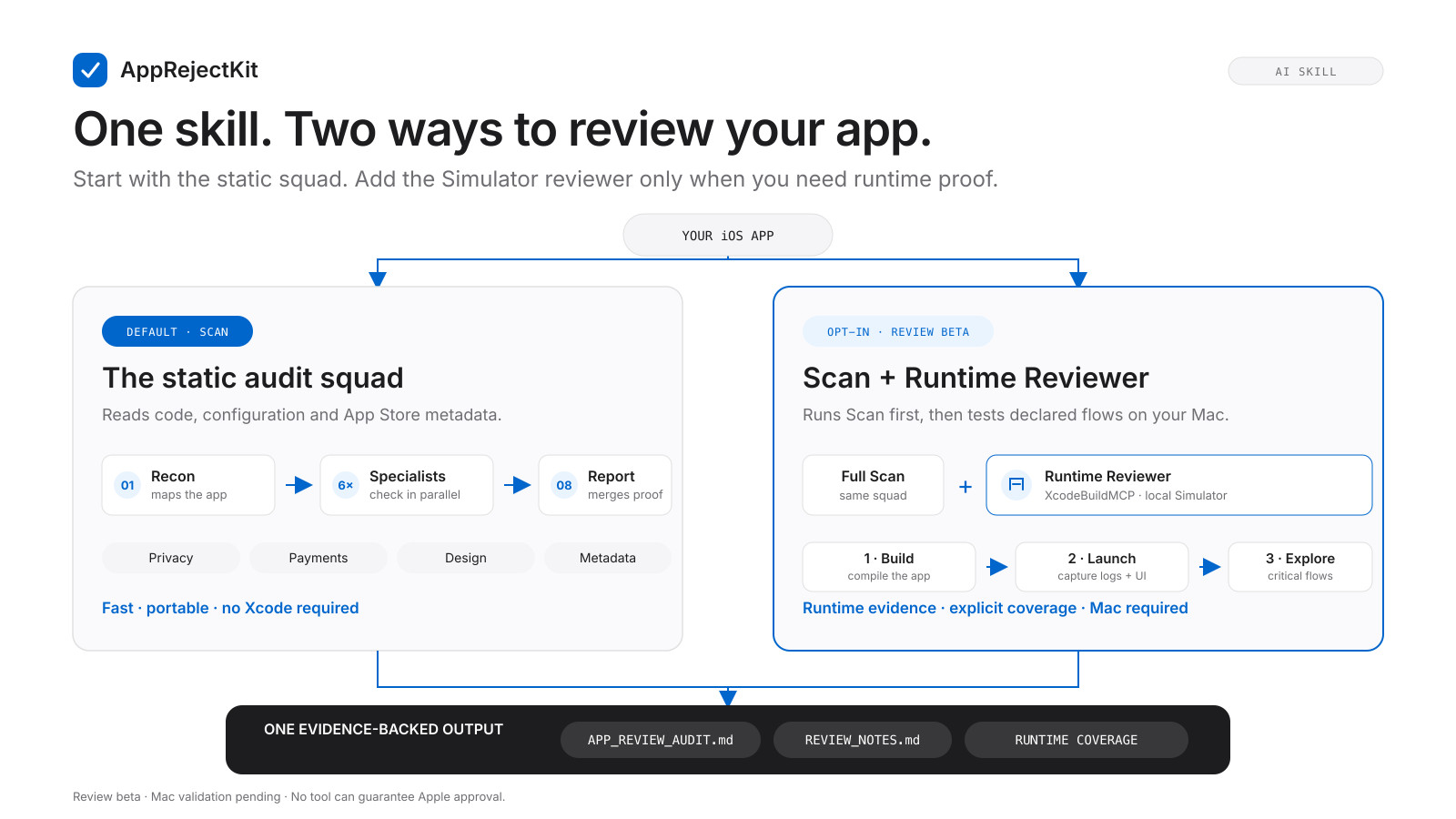
The App Review Squad
Install the kit in Claude Code and ask for an audit. Recon runs first, six
specialists fan out in parallel, and a final agent merges everything into
./app-review-audit/runs/<run_id>/ — a bounded report, full findings index,
REVIEW_NOTES.md ready
to paste into App Store Connect, and REPLY_DRAFTS.md for the
Resolution Center.
- 01 — Recon Identifies the stack, the app type and what the app actually does. Everything else keys off this.
- 02 — Completeness Reviewer access, demo account, launch crashes, placeholder content, iPad, dead links. Guideline 2.1.
- 03 — Privacy Purpose strings vs. APIs used, privacy manifest, Required Reason APIs, ATT, account deletion, labels. Guideline 5.1.
- 04 — Payments IAP vs. external payment, restore, paywall disclosure, trials, win-back, product ids. Guideline 3.1.
- 05 — Design WebView wrapper detection, minimum functionality, Sign in with Apple, hidden features. Guideline 4.2.
- 06 — Content risk User-generated content moderation, AI output, health claims, kids, age rating. Guideline 1.2.
- 07 — Metadata Description vs. reality, screenshots, keywords, export compliance, Review Notes. Guideline 2.3.
- Review mode — Runtime beta Mac validation pending: builds and launches the Simulator app, then walks declared critical flows with bounded UI automation.
- 08 — Report Merges, dedupes, ranks, and writes the report, the Review Notes and the reply drafts.
Every finding carries its evidence, the guideline, the kit fiche that covers it, and whether fixing it needs a new build — a large share of rejections are resolved in App Store Connect without shipping again. The reviewer never intentionally edits source and checks build drift. Review mode runs locally on your Mac with your Xcode, AI and credits, and only covers the configured target and flows named in its report. Physical-device and matched-TestFlight targets remain experimental; untested paths stay explicit. No kit promises approval.
Install it in your tool
Download and unzip — you get a app-store-approval-kit/ folder.
Then, depending on where you code:
- Claude Code
-
Drop the folder into
.claude/skills/(in your project, or~/.claude/for every project). Claude invokes it on its own whenever you mention an App Store rejection. Then say “run a full App Store audit of this app” — or copyaudit/claude-code/app-audit.mdto.claude/commands/and just type/app-audit. - Claude.ai / Desktop
- Add the files to a Project, or attach them to the conversation.
- Cursor
-
Attach the
.mdfiles with@, or pasteindex.mdinto your rules. (No skills here — so no.claude/skills/.) - ChatGPT / Codex
- Attach the folder (or just the files you need) and ask your question.
Outside Claude Code, the squad runs too — Cursor and Claude.ai walk the same
agents in sequence instead of in parallel. Start from
audit/README.md. For a one-off question rather than a full audit,
point your AI at SKILL.md or index.md — both map every
file, so it reads only what’s relevant and keeps token usage low.
What’s inside
- SKILL.md Installable agent-skill manifest (drop the folder into
.claude/skills/). - index.md Map of the kit + how to use it with an AI.
- before-submit.md Pre-submission checklists, self-audit, App Store Connect field guide and glossary — do these before hitting Submit. 12 docs
- by-app-type.md Where AI, subscription, WebView, no-code, crypto and UGC apps get rejected — and the pre-submit must-dos for each. 13 docs
- ai-prompts.md Copy-paste prompts to audit your build with Claude Code / Cursor before Apple does. 6 docs
- fixes-1-safety.md Rejections under Guideline 1 — objectionable / UGC content moderation, broken links, and data security / ATS. 4 docs
- fixes-2-availability-completeness.md Rejections under Guideline 2 — demo access, crashes, placeholder content, backend availability, IAP completeness. 14 docs
- fixes-3-payments.md Rejections under Guideline 3 — in-app purchase rules, subscriptions, external payments, business model. 11 docs
- fixes-4-design.md Rejections under Guideline 4 — minimum functionality, spam/copycat, WebView wrappers, iPad compatibility. 6 docs
- fixes-5-legal-privacy.md Rejections under Guideline 5 — privacy policy, privacy labels, purpose strings, account deletion, ATT, export compliance, and Developer Code of Conduct (5.6) issues like manipulative paywalls and rating prompts. 13 docs
- fixes-other.md Process-level issues — Resolution Center replies, appeals, unresolved-issue loops, and cross-guideline rejections. 5 docs
- templates.md Review Notes, rejection replies, clarifications, appeals and re-review requests — copy, fill the brackets, send. 15 docs
- audit/ The App Review Squad — 8 static roles, optional Runtime Reviewer, guardrails and templates. 31 files
- LICENSE.md Your licence, in the folder: lifetime, yours and your clients’ projects included, not for redistribution. Full Terms.